

Trigger Control Feedback: What Movement Data Can Show
A motion sensor can show how a firearm moved around the trigger press. Learn what that feedback can show, what it cannot, and how to read it.
Trigger control is hard to see from behind the sights. A motion sensor on the firearm can record how the firearm moved before, during and after the press. That gives you something to look at after each repetition. It does not tell you why the firearm moved.
This article explains what that kind of feedback can show and where it stops. It uses a screen from the TEKAIM app preview as an example. That screen shows simulated sample data, not a real session.
Start with safety, not data
No sensor can confirm that a firearm is safe. NSSF defines a safe direction as one in which a bullet cannot possibly strike anyone, taking into account possible ricochets and the fact that bullets can penetrate walls and ceilings. Its rules say you should never point the gun at an unsafe target, even when dry firing with an unloaded gun. They also say to check the chamber, receiver and magazine for yourself. Keep all ammunition in another room, and when you finish, do not take another press after reloading, as Mantis’s dry practice rules advise. Our home safety checklist covers the rest. Follow the manuals for your firearm and training equipment, and local law.
What trigger control means
NRA Family’s Shooting Basics: Trigger Control describes trigger control as moving the trigger and firing the gun without disturbing aim. It recommends moving the trigger straight to the rear and increasing pressure smoothly. It also advises keeping contact with the trigger as the gun fires, then letting it reset.
What happens after the shot counts too. In Focus on Follow-Through, Ed Head describes follow-through as resetting the trigger and looking at the front sight again, rather than jumping off the trigger to see where the shot went.
Both descriptions are about one result: the aim stays where it was while the trigger moves. Movement data measures the second half of that sentence.
What movement data can show
A motion sensor measures its own rotation and acceleration. Mantis describes MantisX as units that contain a gyroscope and accelerometer to track movement during the trigger press. When the sensor is fixed to the firearm, its movement stands in for the firearm’s movement.
With that data, an app can show:
- How much the muzzle moved in the moments around the break
- Which way it moved: down, to one side, or rolling around the bore axis
- When it moved: while you held, during the press, at the break, or after it
- How quickly it settled after the break, if it settled at all
Timing is often the most useful part. Movement that starts just before the break may suggest something in the press. Movement that starts after the break may suggest something in follow-through.
What it cannot show
A sensor on the firearm sees the firearm. It does not see your finger, your grip, your eyes or the sight picture.
NRA Family’s article on curing a flinch lists several signs an instructor watches for, including the muzzle moving before the gun goes off, the shooter’s eyes closing and a fast, hard yank on the trigger. A motion sensor can record muzzle movement, and a hard yank may show up as movement too. It cannot see your eyes or tell you why the movement happened. Different habits can also look similar in motion data. A sideways push from the trigger finger and a change in grip pressure, for example, could both appear as sideways movement or roll.
The same article describes flinch as a reaction to recoil and to anticipating the bang. Dry fire has neither, so a reaction to recoil may not show up the same way in dry fire as it would with live ammunition. A habit of pushing the muzzle in anticipation of the shot can still appear, though, which is why the same article has the shooter dry fire to check that the barrel does not move at the click.
So treat a movement result as an observation. “The muzzle dipped just before the break” is something a sensor can record. “You are anticipating recoil” is a possible cause, and a qualified instructor watching you is in a better position to judge it.
How to read a trigger-control result
- Look at patterns, not single shots. One repetition can be noisy. A movement that shows up in most of a session is worth working on.
- Compare like with like. Keep the firearm, the device position and the drill the same before comparing sessions.
- Check the data first. If the sensor lost connection or a shot was not detected cleanly, set that shot aside instead of reading it as a result.
- Read the target too. A clean press and a poor hit, or the other way around, are both useful. See why laser hits and action scores can differ.
- Change one thing at a time. If the data suggests the press is moving the muzzle, one thing to try, ideally with an instructor’s input, is slowing the press down to see whether the pattern changes.
How TEKAIM’s app preview shows it
TEKAIM is a training device being developed for dry-fire practice. It is designed to mount on the rail under the barrel and send motion data and a trigger event to the app over Bluetooth. Like any sensor on the firearm, it records how the firearm moved, not what the hand did. Before you fit, remove or adjust any device on the firearm, confirm the firearm is unloaded using the home safety checklist, and follow the device’s manual.
In the internal-test build, each shot’s action score is split into six parts. The app’s data definitions describe them like this:
| Part | What the app looks at |
|---|---|
| Stability | How steady the hold was while aiming |
| Trigger | Muzzle disturbance around the break, and how steady the firearm stayed during the press |
| Anticipation | Signs of a downward push just before the break |
| Lateral | Side-to-side shift around the break |
| Follow Through | Whether the firearm stayed steady and recovered after the break |
| Roll | Rotation of the firearm that may come from grip pressure |
For each shot, the app can also list a possible cause. The app’s own definitions treat this as a tendency in the movement data, not a diagnosis. Each shot also has a Data Quality panel, designed to show whether the motion data was valid and whether the camera and sensor records matched.
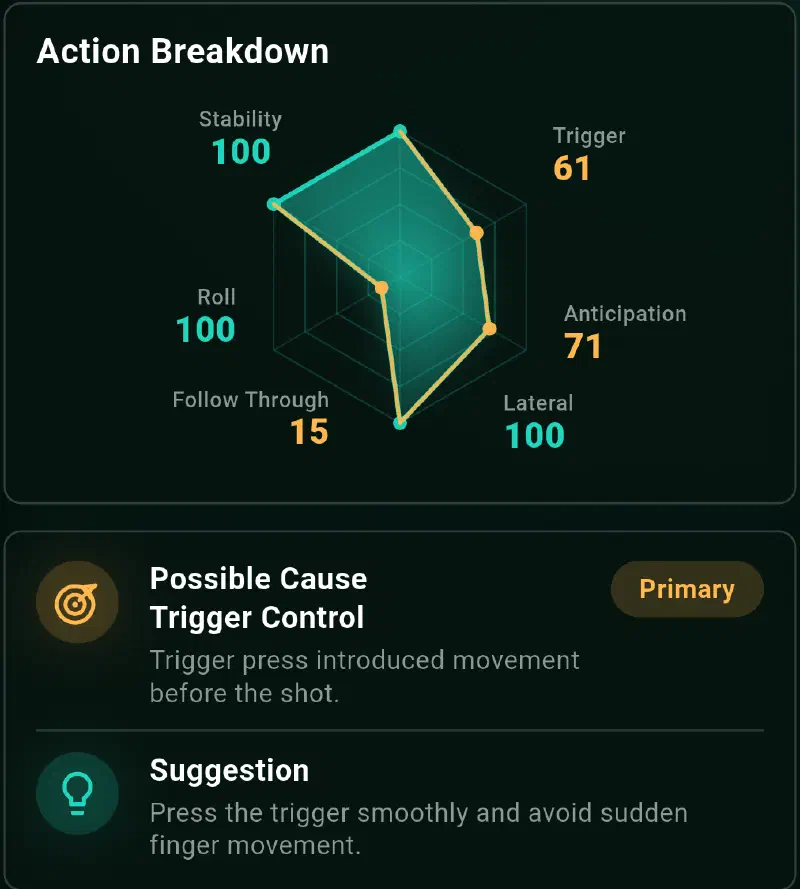
This screen comes from a device simulator running sample data, so the numbers do not describe a real shooter. TEKAIM’s scoring rules, including how dry-fire practice is scored, are still being adjusted and validated. Do not treat the scores in these previews as a benchmark. We do not publish accuracy figures yet. See how it works for the current setup.
This article is general educational information. It is not a substitute for hands-on instruction from a qualified instructor, local laws and range rules, or the manuals for your firearm and training equipment.